
9 March 2024
UX Research
Adding a Message Scheduling Feature to WhatsApp Messenger
Project Overview
WhatsApp is one of the most widely used messaging platforms globally, serving both personal and professional communication needs. Despite its extensive features, one critical capability is missing; a message scheduling feature. The absence of such a feature creates inefficiencies for users who want to send messages at specific times. This limitation results in missed opportunities, untimely communications and the mental burden of having to remember to send messages.
Timeframe
2 Weeks
My role
UX + UI Design, Visual design, Branding, User flow, Research, Prototyping + Testing
Tools
Figma, Fig jam, Zoom, Google Forms
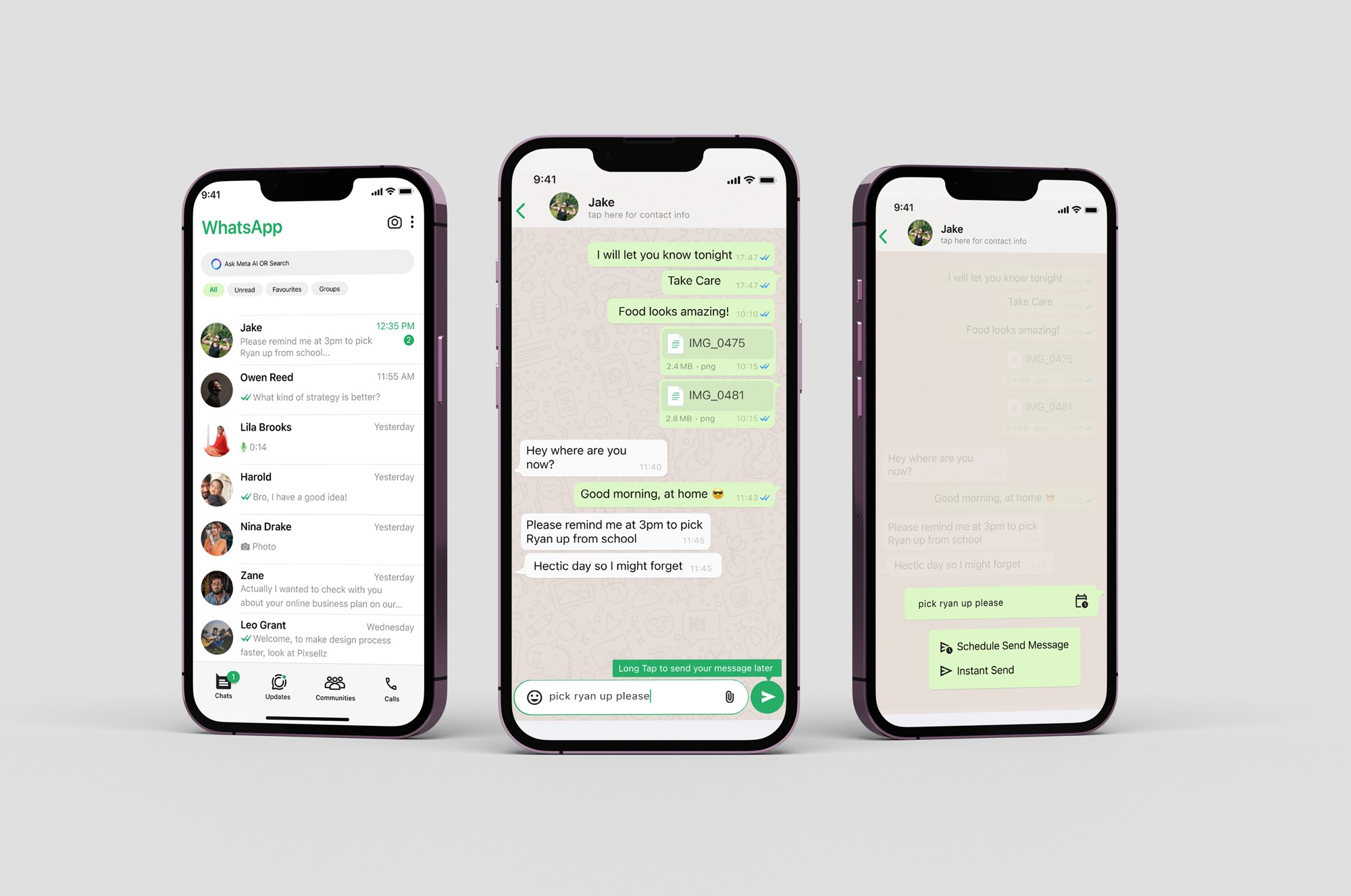
The Challenge
WhatsApp lacks a feature to schedule messages for future delivery.
Users currently face difficulties with coordinating the timing of their messages, particularly across different time zones or work schedules. Without scheduling capabilities, they are forced to rely on memory or third-party tools, leading to frustration and a less seamless messaging experience.
Objective/Goal
Conceptualise, design and prototype a message scheduling feature for WhatsApp. This feature will enable users to schedule messages to be sent at a later time or date, providing more flexibility and convenience in communication.
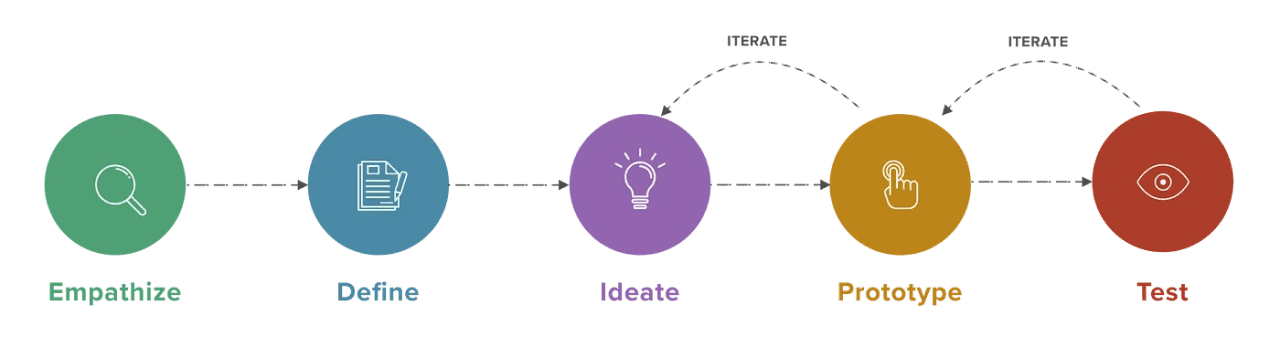
My Design Process
Research
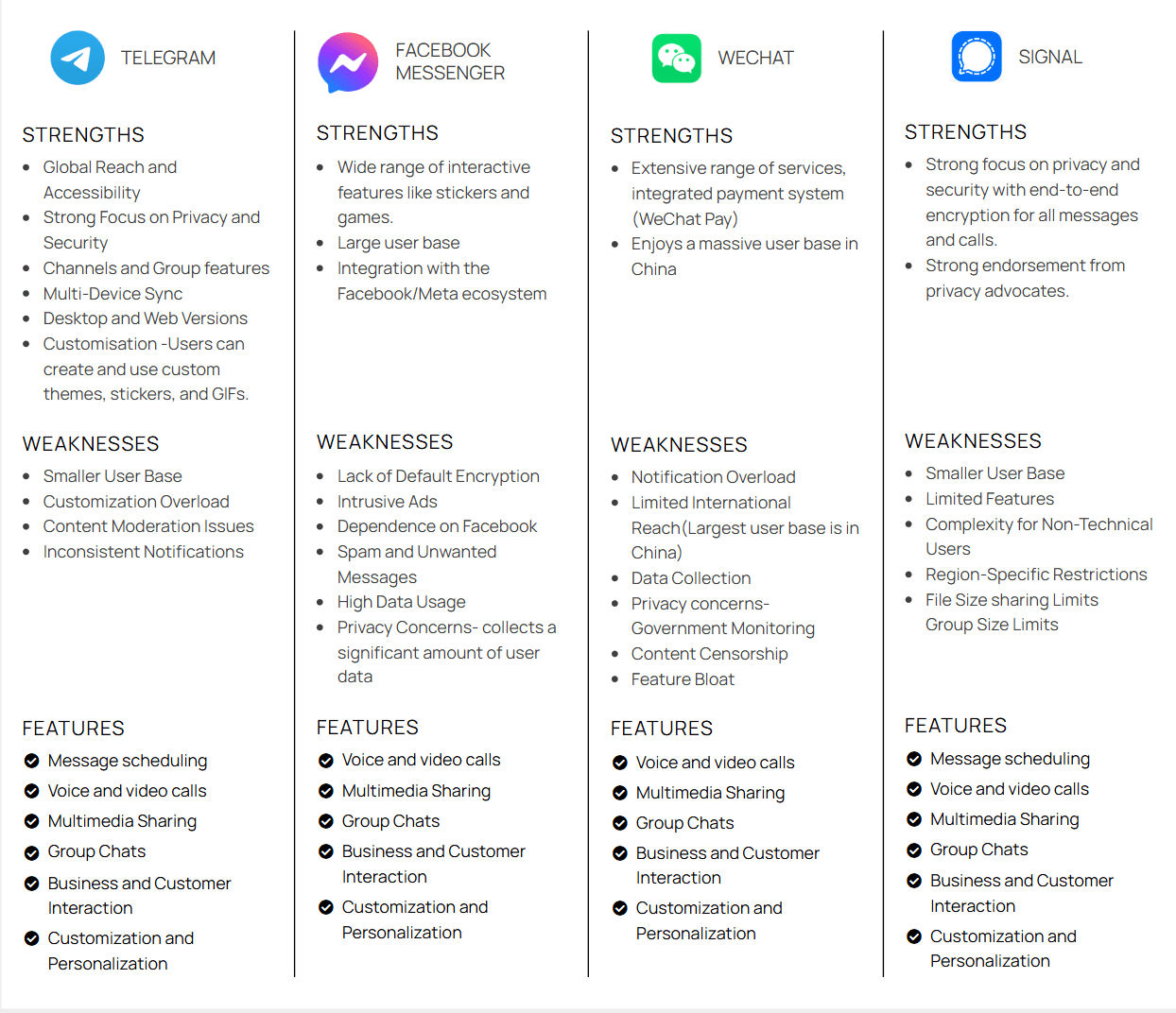
COMPETITIVE MARKET ANALYSIS
I conducted a competitive market analysis of other messaging apps like Telegram and Facebook Messenger, both of which have message scheduling features. The analysis focused on understanding the strengths and weaknesses of these features and identifying opportunities to create a superior user experience within WhatsApp.
User Interviews
To Gain a better understanding of user needs, I conducted user interviews
I conducted interviews with 5 WhatsApp users, including professionals, students and general users. The interviews focused on their communication habits, the challenges they face with scheduling messages and their expectations of such a feature.
Key Insights
Time Management
75% of users expressed a strong desire for a scheduling feature to help them manage their communications without needing to remember to send messages at an exact time.
Timezone Differences
Users who regularly communicate with people in different time zones find it challenging to send messages at appropriate times, leading to messages being sent too early or too late.
Recurring Reminders
Many users, especially those in professional settings, need to send follow-up messages or reminders on a recurring basis. Automating this process would significantly ease their workload.
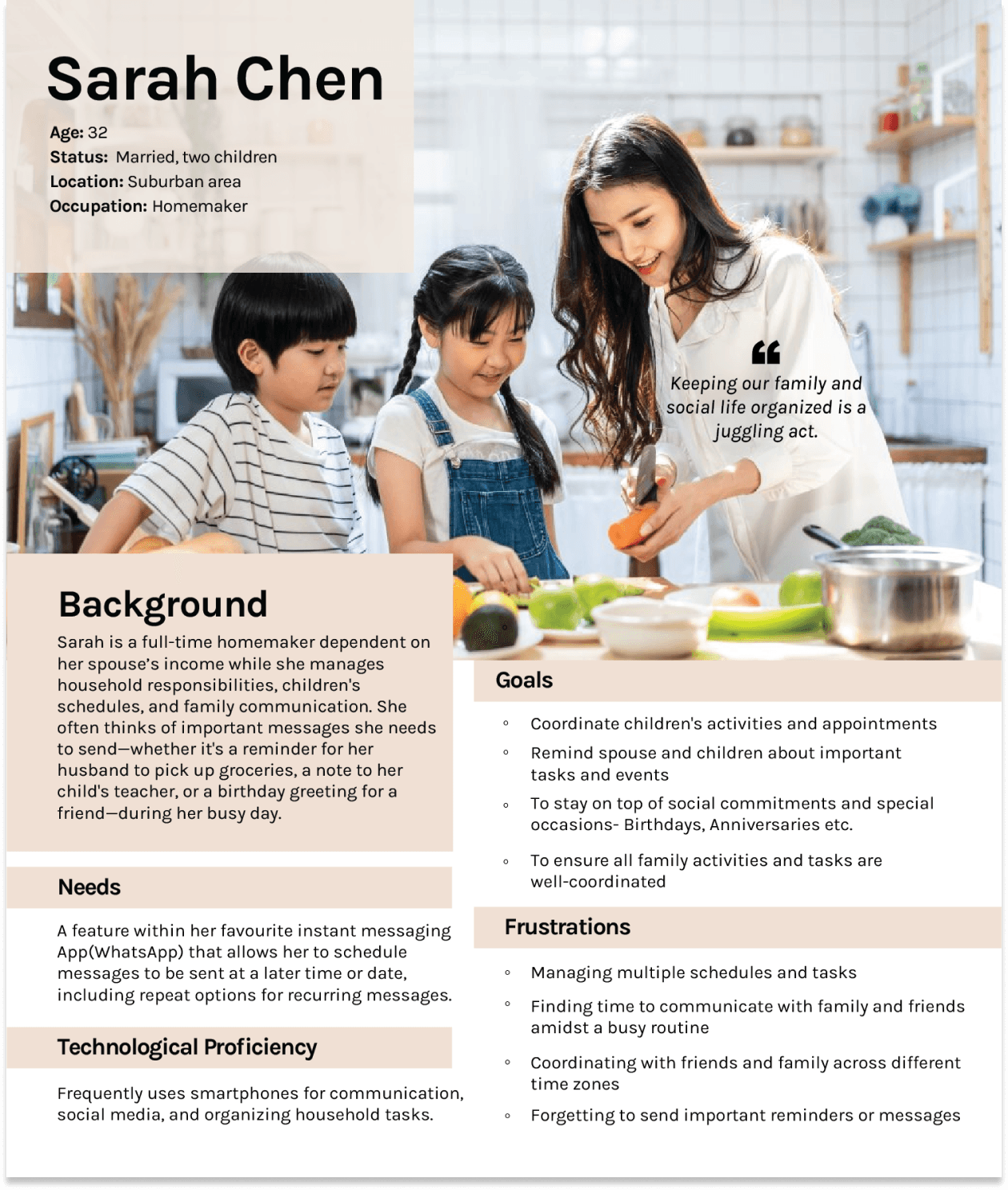
User Personas
With the knowledge and insights gained from the interviews, personas were created to understand the unique qualities, preferences and behaviours of the people most likely to benefit from the added feature.
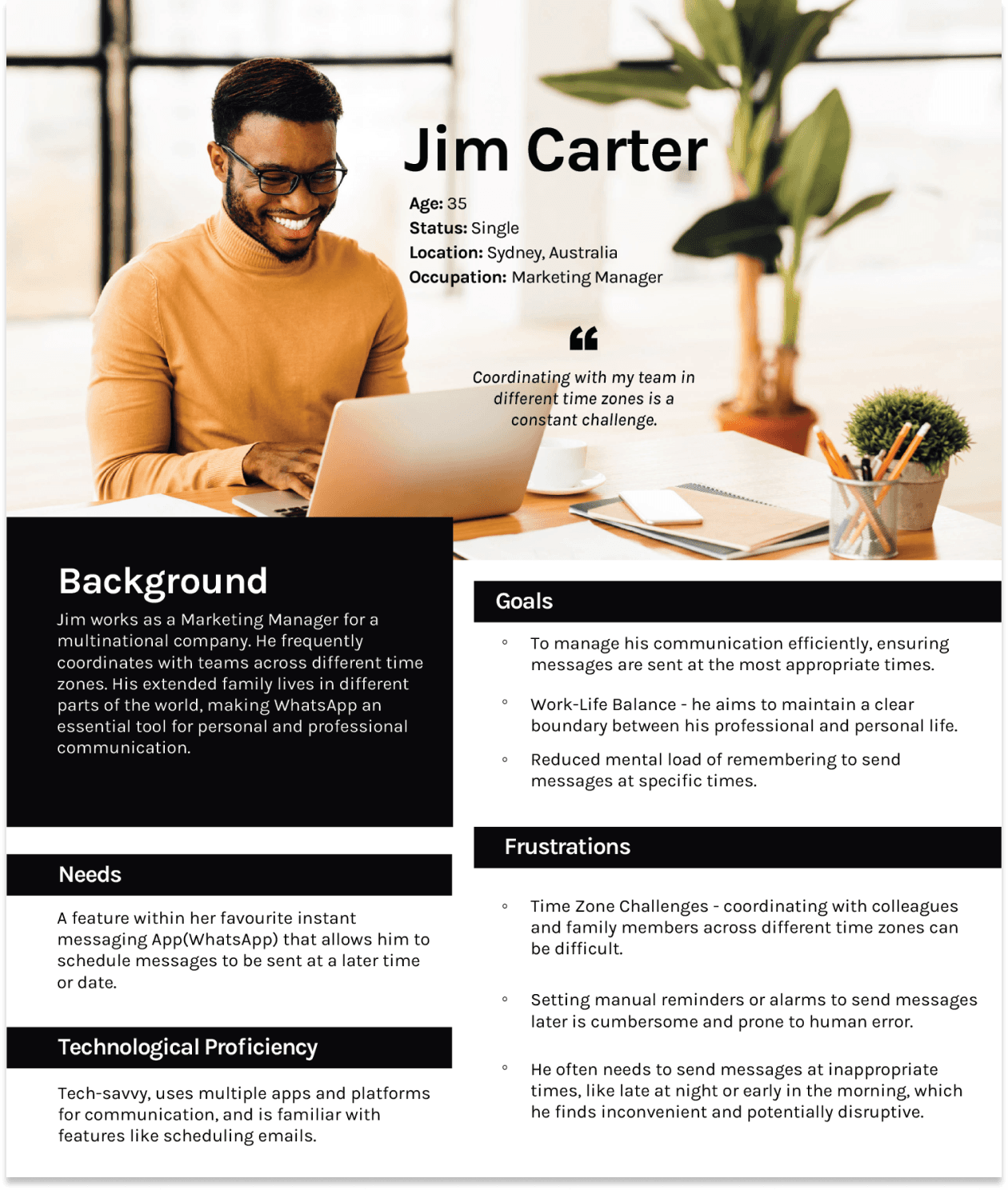
POV
Points of View
Busy professionals and individuals need a way to schedule messages on WhatsApp to ensure timely communication without the burden of real-time message management. Their demanding schedules and the complexities of different time zones make it challenging to send messages at appropriate times.
HMW
How Might We
How might we design a message scheduling feature on WhatsApp that allows users to efficiently plan and send messages at appropriate times, reducing their mental load and enhancing communication efficiency without compromising the app’s real-time interaction appeal?
Project Goals
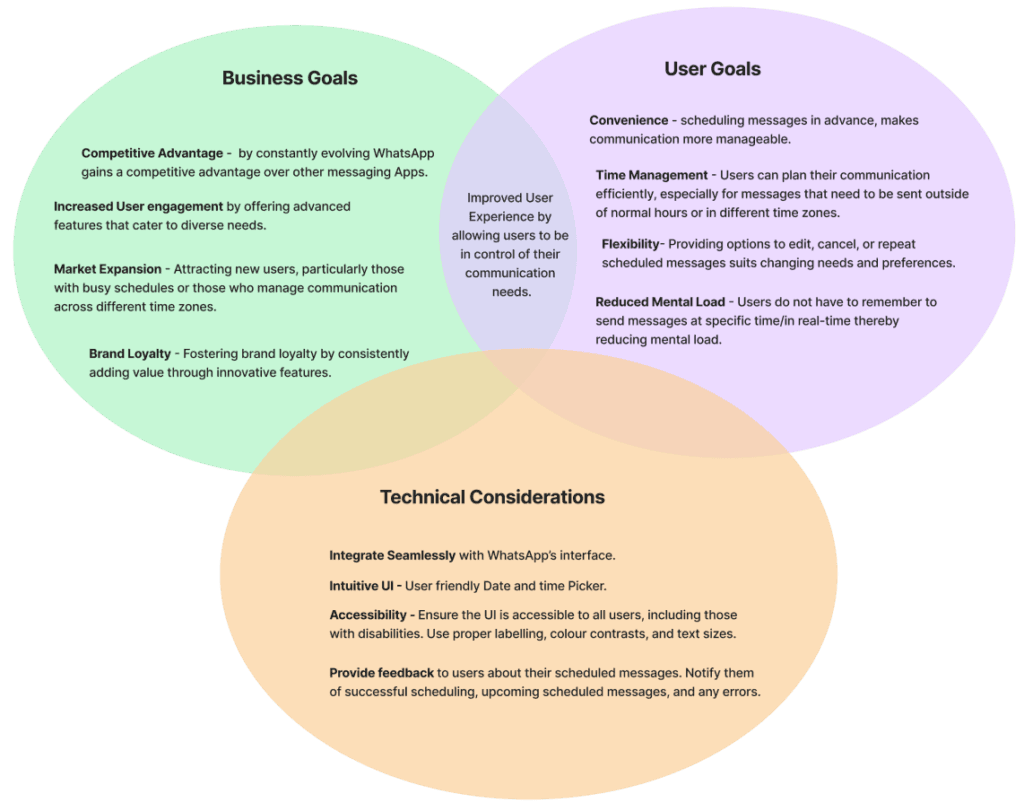
The feature set Venn diagram helps streamline decision-making in UX design by providing a clear, visual representation of how different features relate to each other and to user needs or market offerings.
User Flow
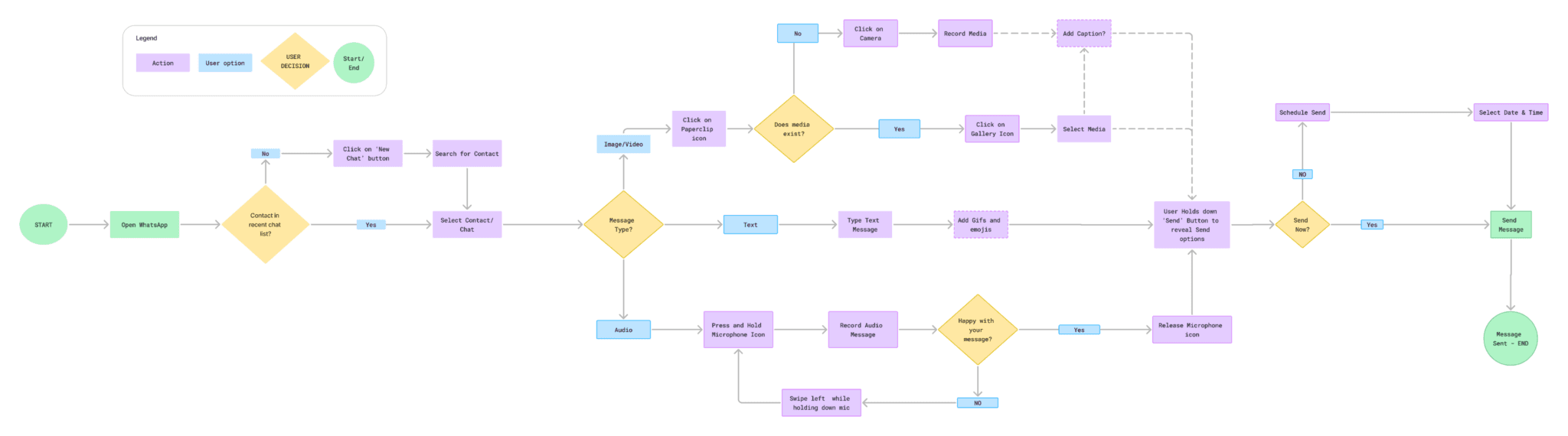
I created a user flow chart to show the ways in which users might interact with this new feature. Doing this would help me make sure I include all necessary key frames I would need as I created wireframes for my prototype.
Low - Mid Fidelity Wireframes
I went ahead with drafting annotated low fidelity frames that would help visualise how this new feature would fit in WhatsApp’s existing interface.
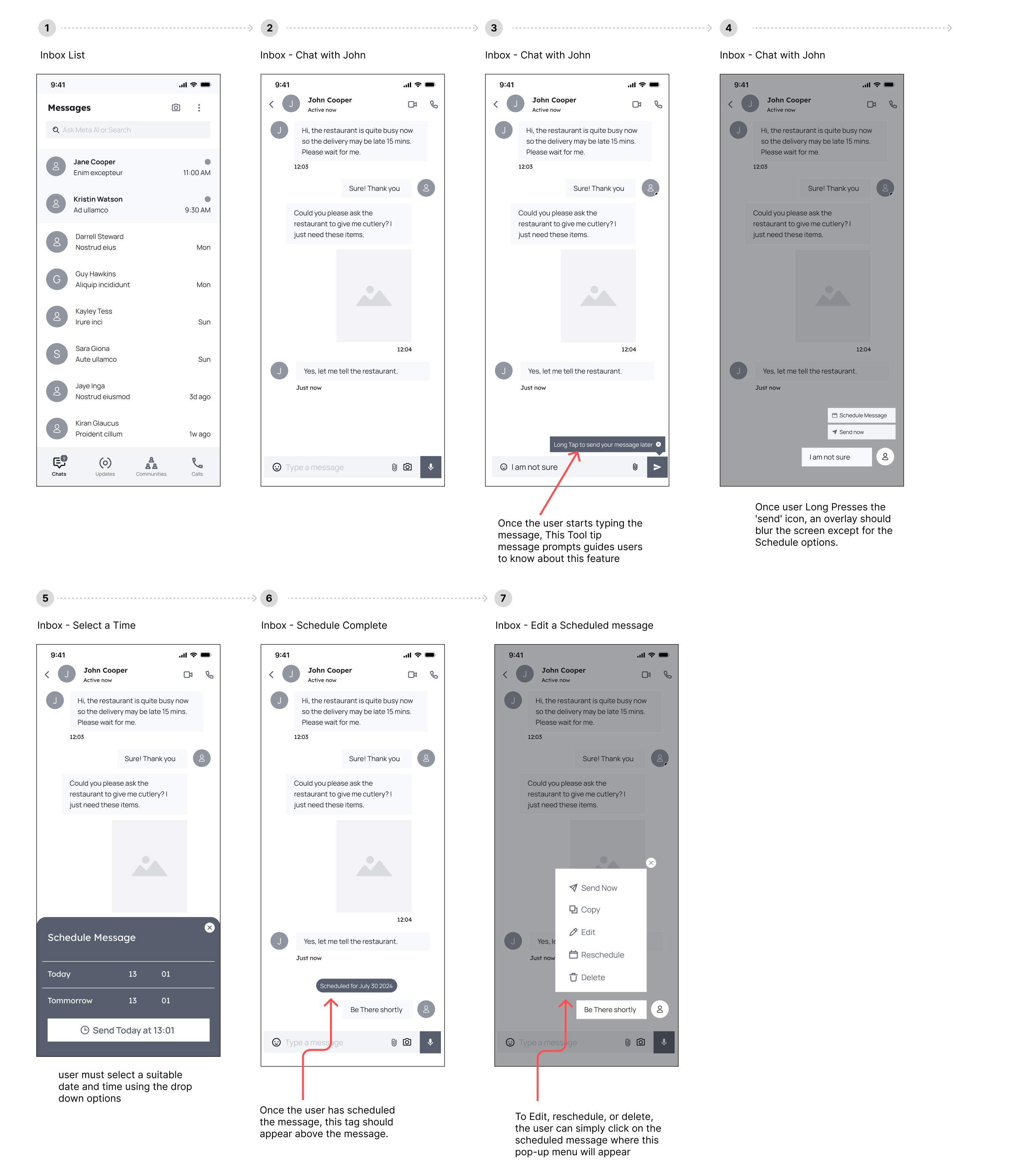
Click here to view Low - Mid Fidelity Wireframes in Figma
High Fidelity Frames
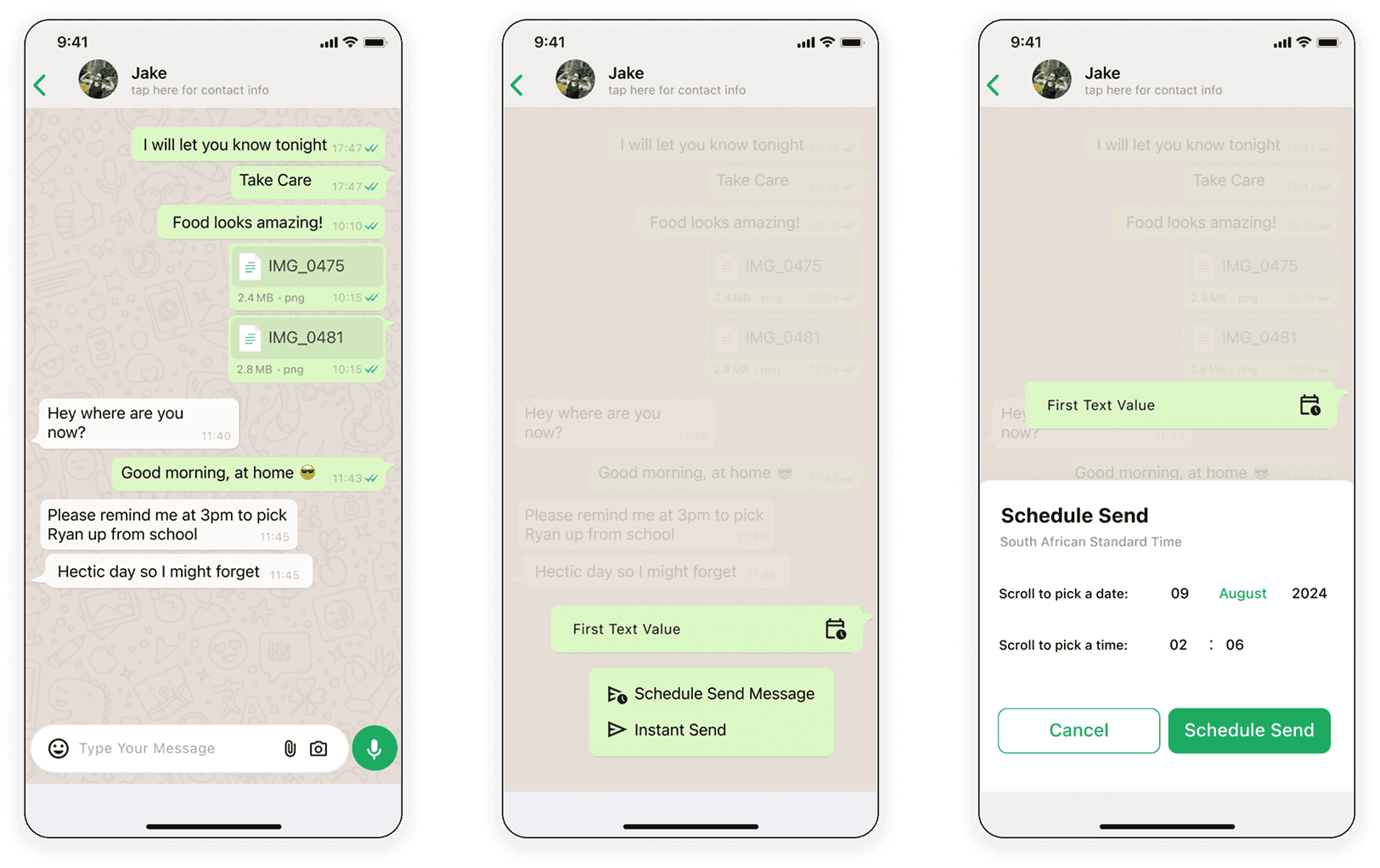
After figuring out how the feature could work as well as placement, I proceeded to design high-fidelity frames. It was imperative that this new feature fit seamlessly into WhatsApp’s interface. The same colours, fonts and graphics were used.
Usability Testing
I was able to test 5 users remotely. I sent them the prototype link, explained the project background and presented them with a scenario:
Scenario: Schedule a reminder message for your partner to pick your son up from school at 15h00.
Sub-tasks
Open WhatsApp and select the partner’s chat (most recent).
Type a reminder message about picking up the child.
Schedule the message to be sent 15 minutes before school closes at 15h00
Task 1
All users were able to open the prototype and felt that the interface was very familiar. They completed the scenario independently and with minimal friction.
Task 2
All Users could easily type a message and spotted the scheduling tooltip prompt.
Task 3
All users could Schedule the message to be sent 15 minutes before school dismisses at 15:00
User Feedback:
“This is so simple to use. I was done typing my message and scheduling it in less than 60 seconds!”
“This is a great feature hopefully in the future it could schedule attachments too, such as photos, videos, and documents.”
“I would love to see predefined time Options like “Later Today,” “Tomorrow,” and “Next Week” to speed up the process.”
Iterations
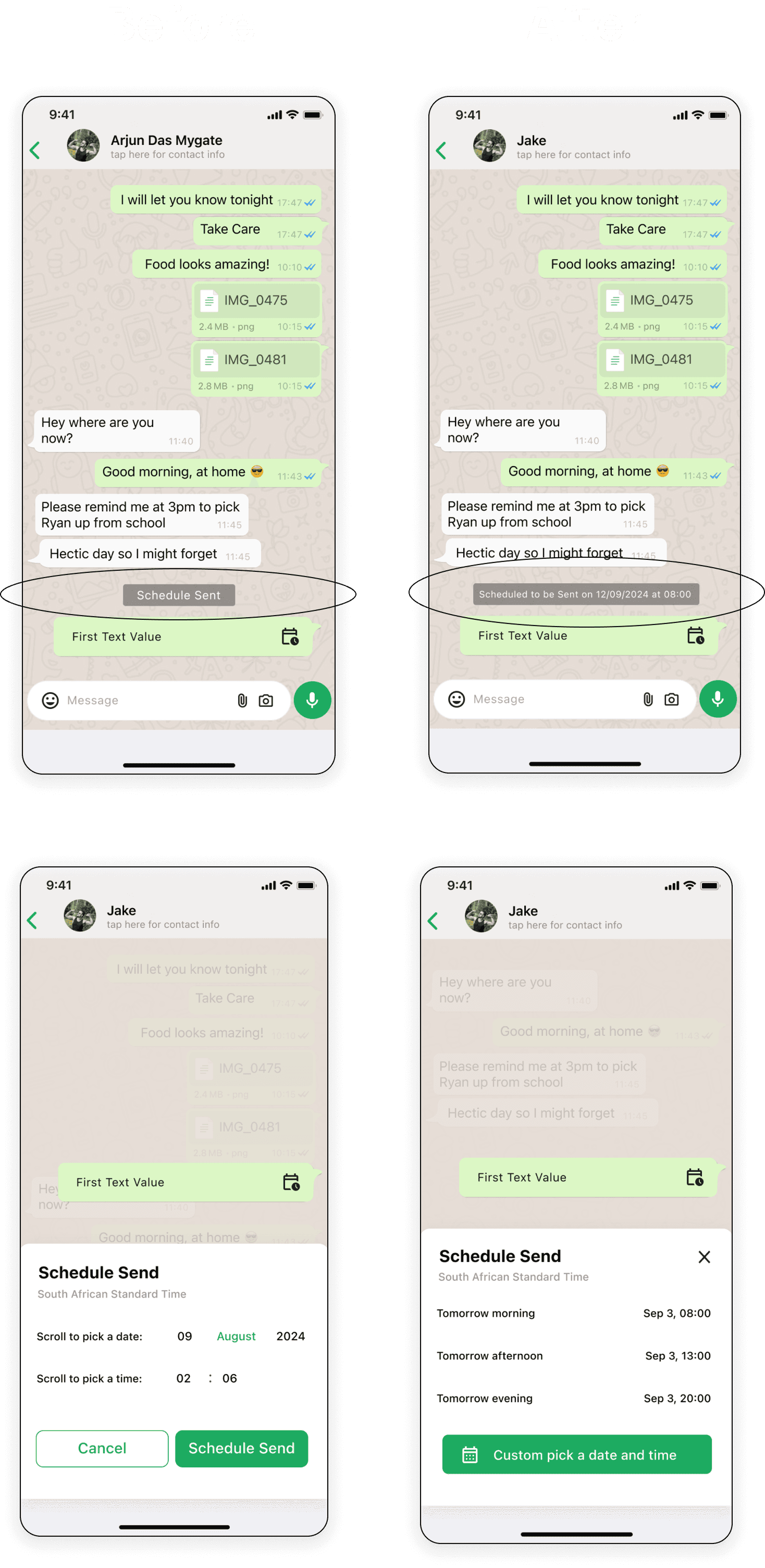
Firstly, I added a detailed label that appears above scheduled messages so that users can distinguish between real-time messages and scheduled ones.
Iterations
Secondly, I added an extra step with predefined time options to the message scheduling feature. This enhancement simplifies the scheduling process by providing quick access to commonly used times like ‘Later Today,’ ‘Tomorrow’ and ‘Next Week.’ These predefined options allow users to quickly select common times, significantly speeding up the scheduling process. This streamlines the user experience and addresses the needs identified in user testing. By reducing the number of steps and decisions required, the feature becomes more intuitive and reduces the cognitive load on users.
The final design was a well-rounded solution that integrated seamlessly into WhatsApp’s existing interface while providing the much-needed scheduling functionality.
Key features included:
Message Scheduling: Integrated directly into the message input field for easy access.
Predefined Time Options: Quick scheduling options for common times, allowing users to set messages with minimal effort.
Custom Scheduling: A flexible calendar interface for users who need to set specific dates and times.
View Hi-Fi Prototype
Closing
Future Impact
For future iterations, I recommend adding more customization options, such as allowing users to set their own presets for recurring messages. This would give users even more control over their communication.
Secondly, I would recommend exploring the integration of the scheduling feature with WhatsApp’s existing functionalities, such as group chats and media sharing, could further enhance its utility and appeal.
Lastly, to ensure users are aware of the new feature, implementing tooltips or a brief onboarding tutorial within the app could help users discover and use the scheduling feature.
Next Project :